Go2Run features / SEO
Build your website. Then check its search foundations.
SEO supports the website you build. Go2Run helps you find technical issues, make AI-assisted changes and check the result after publishing. You stay in control of the content and release.
From first scan to live recheck
Automatic checks
Scan the published site
Open Dashboard → SEO in your workspace and select the live site. Review each issue and its affected pages.
AI assistance · uses credits
Choose an issue to fix
Expand an issue and choose the AI repair action. After confirmation, AI edits the project. Review the changes in chat and preview.
You publish · automatic recheck
Publish and scan again
Approve the changes, publish and wait for success. Then scan the live site again. A preview change is not yet a live change.
A real canonical-link repair
October 14, 2026 · Static test page · Actual product screenshots
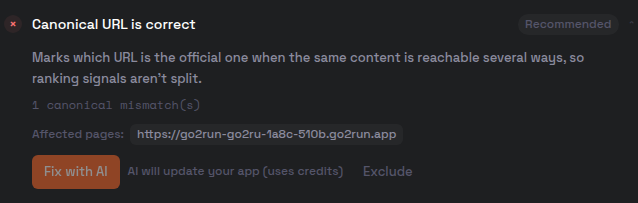
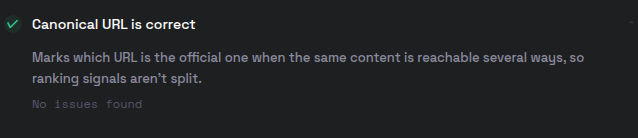
This is a technical repair on one test page. It does not mean every site check passed, and it is not a traffic or ranking case study.
What did we actually test?
These steps were tested in production on October 14, 2026, using a published static test page. They demonstrate the workflow, not a promise of identical results for every website.
- Live scan · automatic
- The report returned checks for titles, descriptions, canonical links, crawler rules and sitemaps, with affected pages. This scan included passes, failures and suggestions.
- Canonical repair · AI-assisted
- We selected the failed check and confirmed an AI repair using credits. AI edited the project. After human review and a new publication, we scanned the live site to verify that check. Other repair types were not individually tested in this demonstration.
- Publishing and decisions · yours
- Review the AI changes and start publication yourself. You decide on a custom domain, factual content and whether a site is ready to be public. AI should not invent company details, contact information or customer stories.
Before you start
- You need an existing project and a reachable scan target. This demonstration uses a published site. Publishing access depends on your current plan and workspace permissions.
- AI repairs change your application and use credits. Review the scope and preview before publishing. Failed releases and remaining issues need further attention.
- Other issues remained on this test page. A passed check means that particular check met the rules in that scan.
- Scanning and repairs do not guarantee crawling, indexing, rankings or traffic, and there is no fixed indexing time. Product check results are not a Google score.
Start with the website you want to build
Create, preview and publish. Then use SEO checks to find opportunities to improve it.
Open your workspace